Create. Compress. Iterate.

Building with AI

AI amplifies whoever is holding it. These are the things I've built for my family, my coaching practice, my clients, and myself, with AI as a building partner

Filter
2026 Q3
July 2026
My Review System, augmented by AI
July 2026
My Review System, augmented by AI
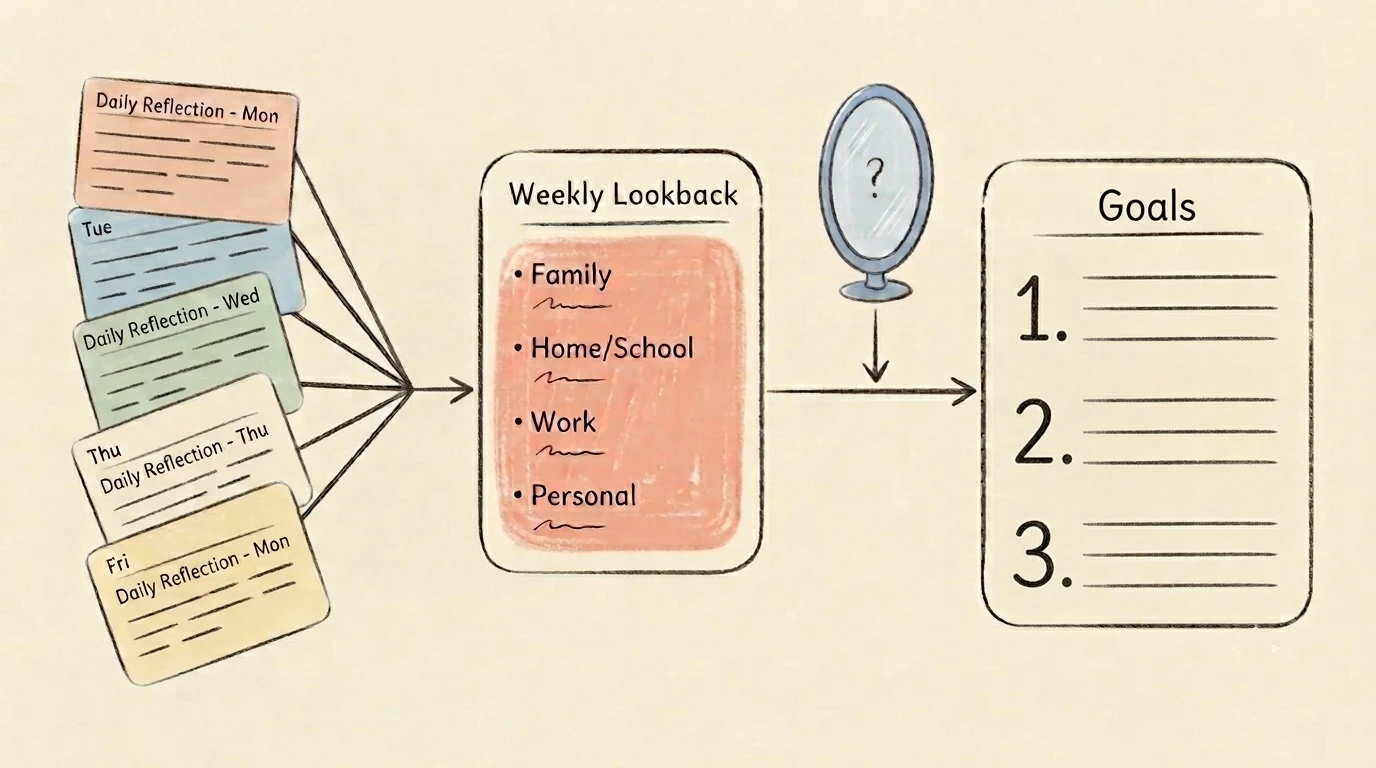
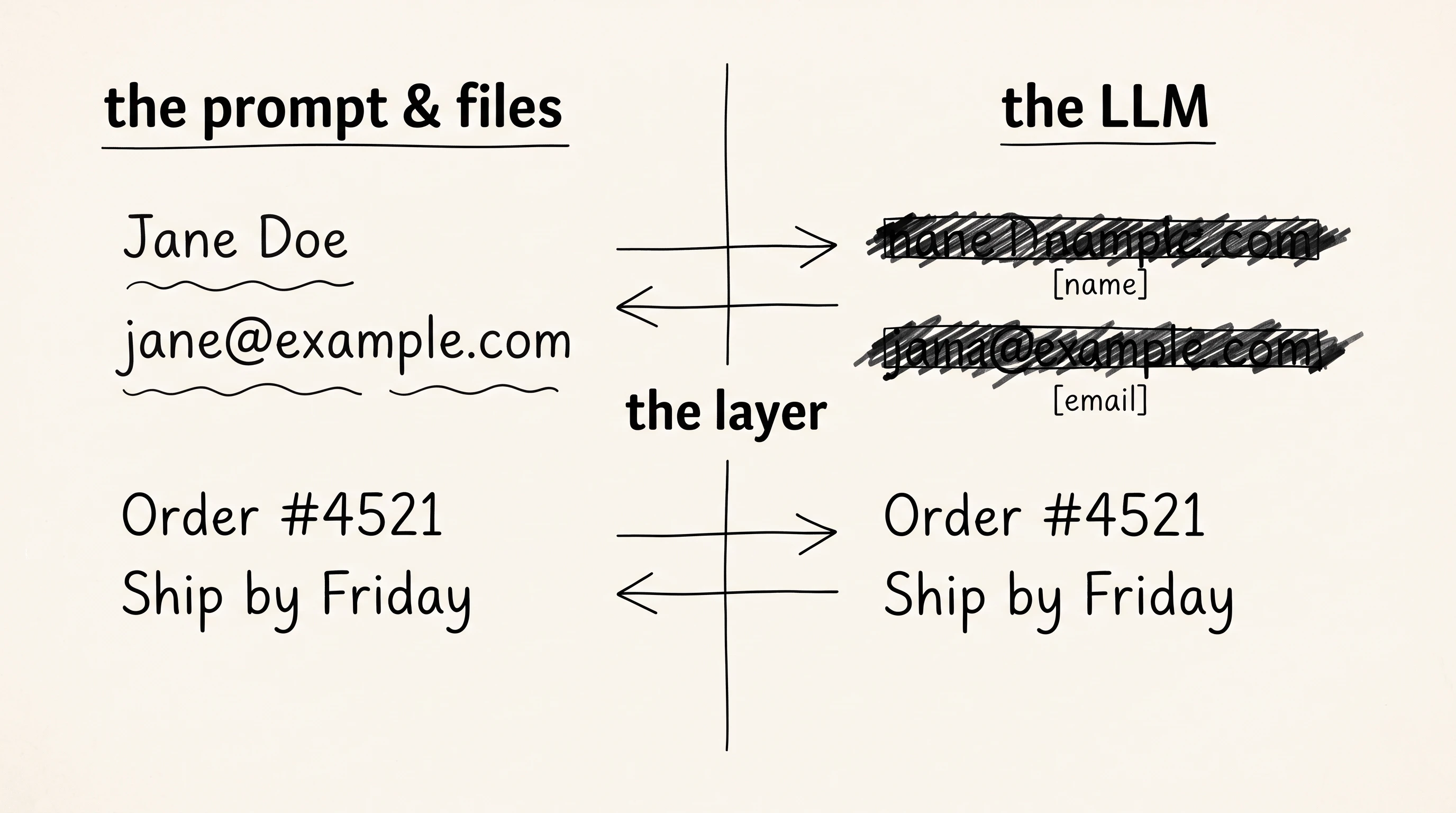
An AI layer on my weekly and monthly review process that summarizes my lookback, mirrors back like a coach, and sharpens my goals.
FamilyWorkflow
My Review System, augmented by AI
Why It Matters to Me

Summarizing my weekly and monthly lookbacks by hand took real time. AI cut that down, but the bigger improvement was perspective. Fed my longer-term goals and other context, the LLM asked questions like a good coach would and surfaced perspectives I'd miss reviewing alone. It's also sharpened my milestones and pushed me toward more ambitious ones.

My Learnings
  1. Compression trades my own richness for speed: Writing my own summary by hand kept more nuance and detail. Handing it to an LLM is faster, but I expect to revisit this trade-off.
  2. LLMs can surface interesting insights: Given my own goals and context, the LLM named patterns I'd missed and pushed my thinking further than reviewing solo.
  3. New sources are easy to fold in: Rather than copying and pasting, I used Notion's CLI to pull information I'd already stored there directly into the process.
July 2026
Parenting Book Synthesis
July 2026
Parenting Book Synthesis
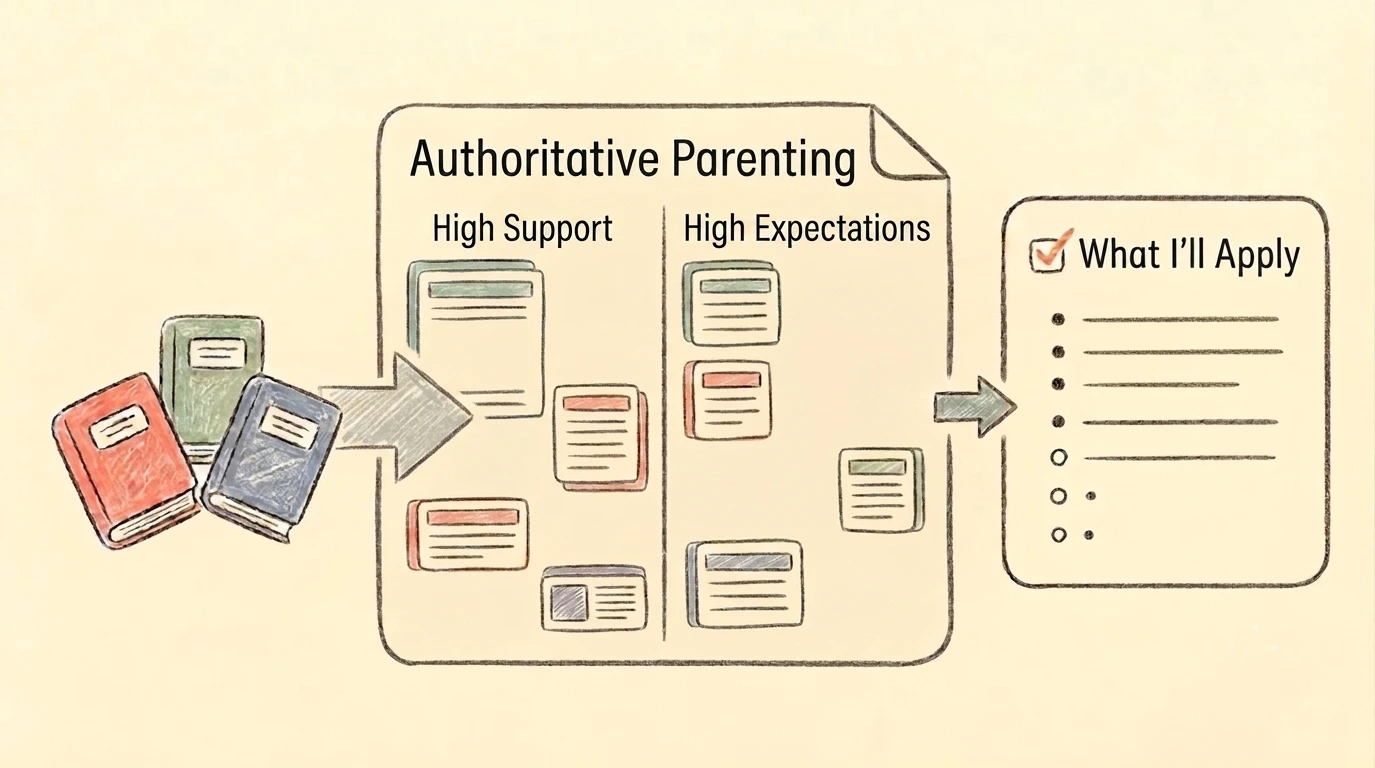
A workflow that looks across parenting book notes and synthesize where they agree and contradict against the authoritative parenting framework (high expectations, high support), so that I can think through and decide what I want to apply at home.
FamilyWorkflow
Parenting Book Synthesis
Why It Matters to Me

After reading 3 parenting books back to back, I had plenty of ideas and advice but no clear read on what I wanted to actually do at home. Running hte notes through the authoritative parenting frameworks (high expectations, high support) organized the ideas by theme, so I could compare and contrast ideas before deciding on which one to implement.

My Learnings
  1. Contradictions reveal each author's real stance: Naming where the books flatly disagreed, like The Collapse of Parenting command vs. Self Driven Child consultant, showed how strongly each one actually leaned. This made it easier to compare and contrast ideas and make a decision on them.
  2. This is the natural next step after book notes, not a separate workflow: It's the same synthesis instinct as the book-notes workflow, just one level up, across books instead of within one. The next step from here is the applied version: turning the framework into actual day-to-day parenting decisions.
2026 Q2
June 2026
Automated SMB Site & SEO Audit
June 2026
Automated SMB Site & SEO Audit
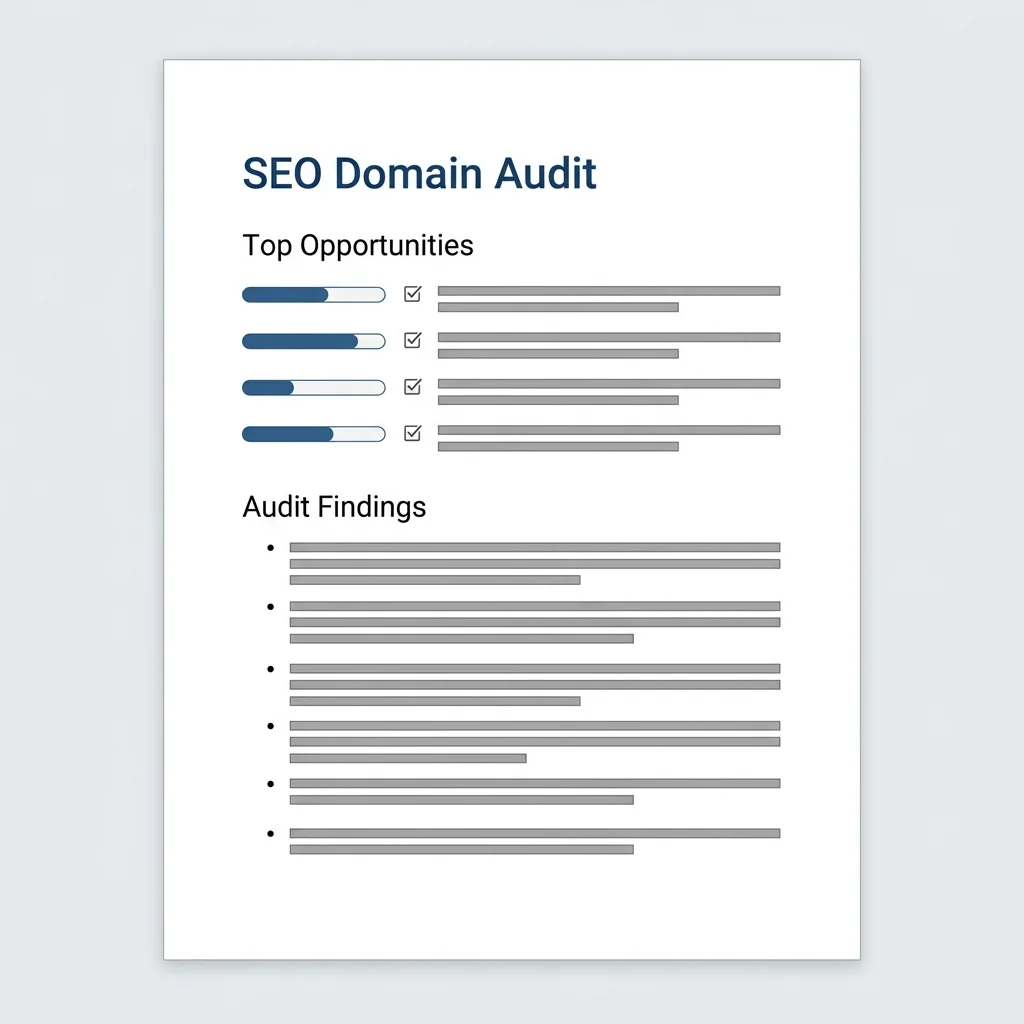
Workflow that pulls quantitative search data and scrapes a client's site to run a full conversion, tracking, and local SEO diagnostic for a site.
AI ConsultingWorkflow
Automated SMB Site & SEO Audit
Why It Matters to Me

Before pitching a new client, I need to understand their digital presence and identify the top opportunities to know if they're a good fit. I can do this quickly by combining SEMrush data and direct website crawl, which makes this analysis cost and time-effective.

My Learnings
  1. Tailoring search queries for better relevancy and efficiency: Pulling every keyword and backlink report for every domain wastes API credits. Scoping queries based on client profile (e.g. Maps pack rankings for local SMBs) keeps data relevant and cost-effective
  2. Integrating workflows into daily channels: I regularly build AI workflows in development environments, but outputting results directly to normal channels like PDF and email allows for much easier adoption
June 2026
June Goal Posters
June 2026
June Goal Posters
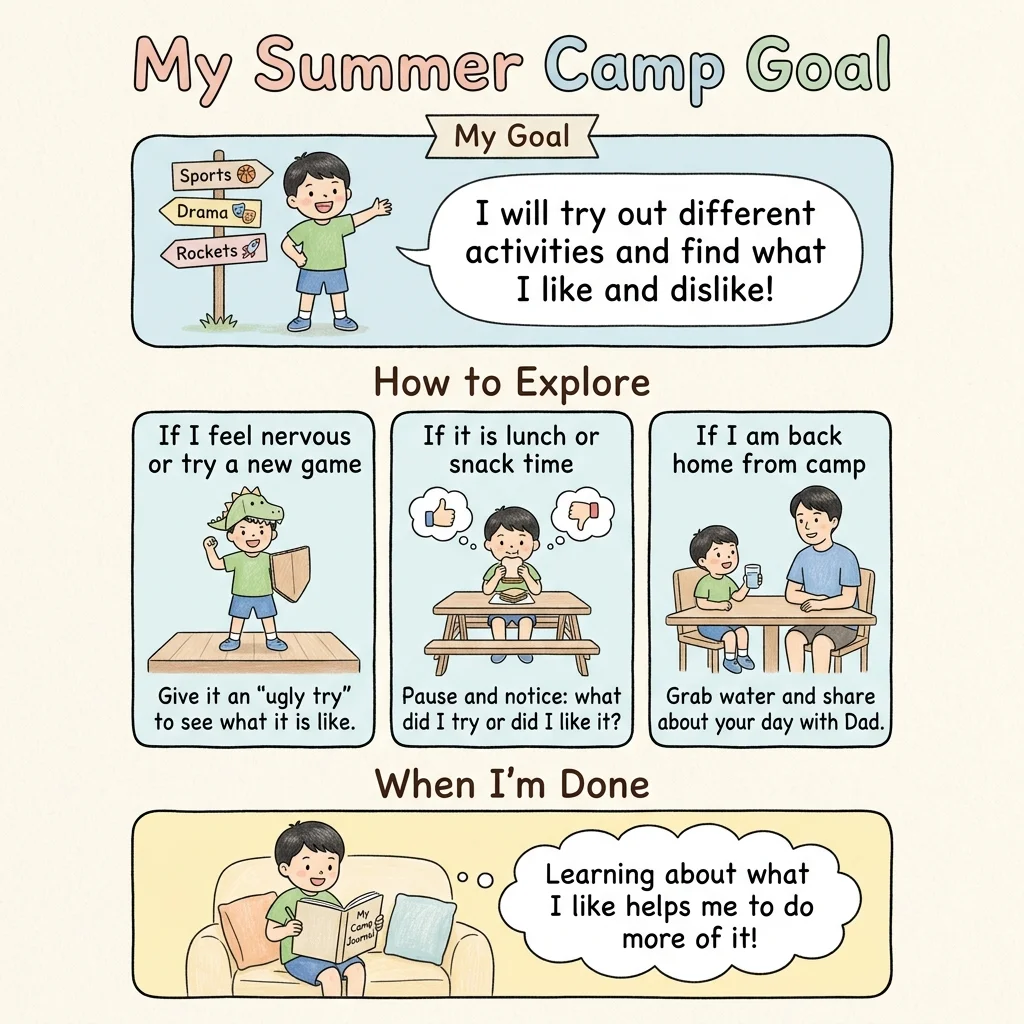
A physical monthly goal poster to reinforce the kids' self-chosen goals, inspired by principles from mental contrasting and Self Driven Child by Ned Johnson and Dr. Bill Stixrud.
FamilyPrintable
June Goal Posters
Why It Matters to Me

Our family goals lives in Notion that we only saw visually once a month. These posters brought the goals into our daily environment, so we can reference it frequently and in real-time, especially when we hit one of our predicted obstacles.

My Learnings
  1. Put cognitive theory into visual practice: Translating mental contrasting into a physical layout with illustrations makes concepts simple and actionable for kids.
  2. Visual consistency is key for recognition: Letting the kids choose their own goals, provide their own obstacles, and creating imagery that look like them directly increases engagement.
  3. Keep physical reminders lightweight and temporary: Designing these as monthly printables makes it easy to iterate on their goals and swap them out for whatever is most pressing
June 2026
One-Shot Poster Playbook
June 2026
One-Shot Poster Playbook
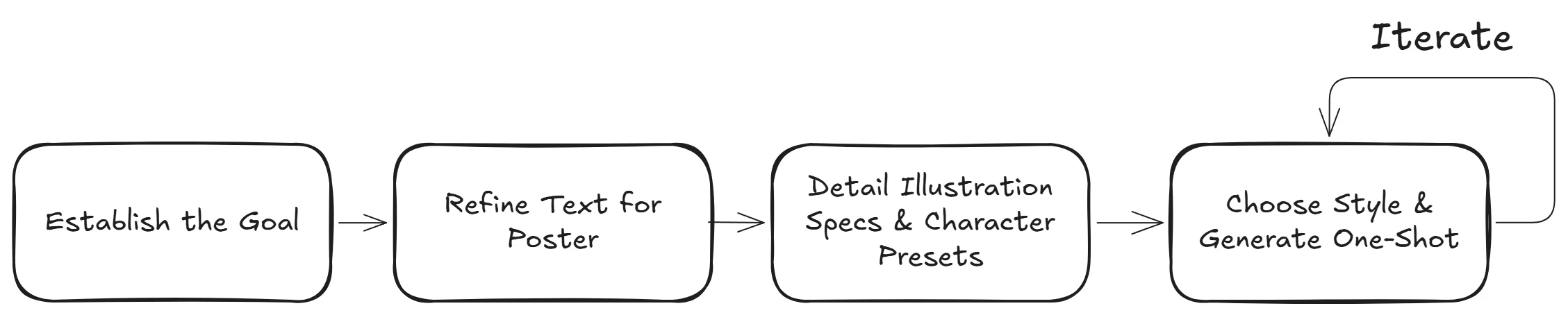
A workflow driven, human-in-the-loop playbook to generate personalized posters for my kids.
FamilyWorkflow
One-Shot Poster Playbook
Why It Matters to Me

My first iterations of posters required many back and forth, time consuming prompts (especially when telling to adjust only one part of the poster). This structured playbook allows me to generate a 90% complete poster in a single shot.

My Learnings
  1. Define the text and final layout first: Text is much cheaper and easier to iterate on than imagery. Locking in the copy and card structure upfront made it so that generating the full image later was much easier.
  2. Transition from manual learning to a human-in-the-loop workflow: Transitioning from manual prompting in an LLM chat to a structured playbook was a natural evolution once the steps became repeatable. It streamlined the creation loop while keeping me in the seat to see different options, approve phrasing, and ultimately create the best poster.
  3. Use one-shot image generation over stilted HTML grids: My initial attempts, which used HTML templates to position separate illustrations, looked too rigid and stilted. Shifting to a single, descriptive prompt made the final poster much better.
May 2026
Coaching Invoice Automation
May 2026
Coaching Invoice Automation
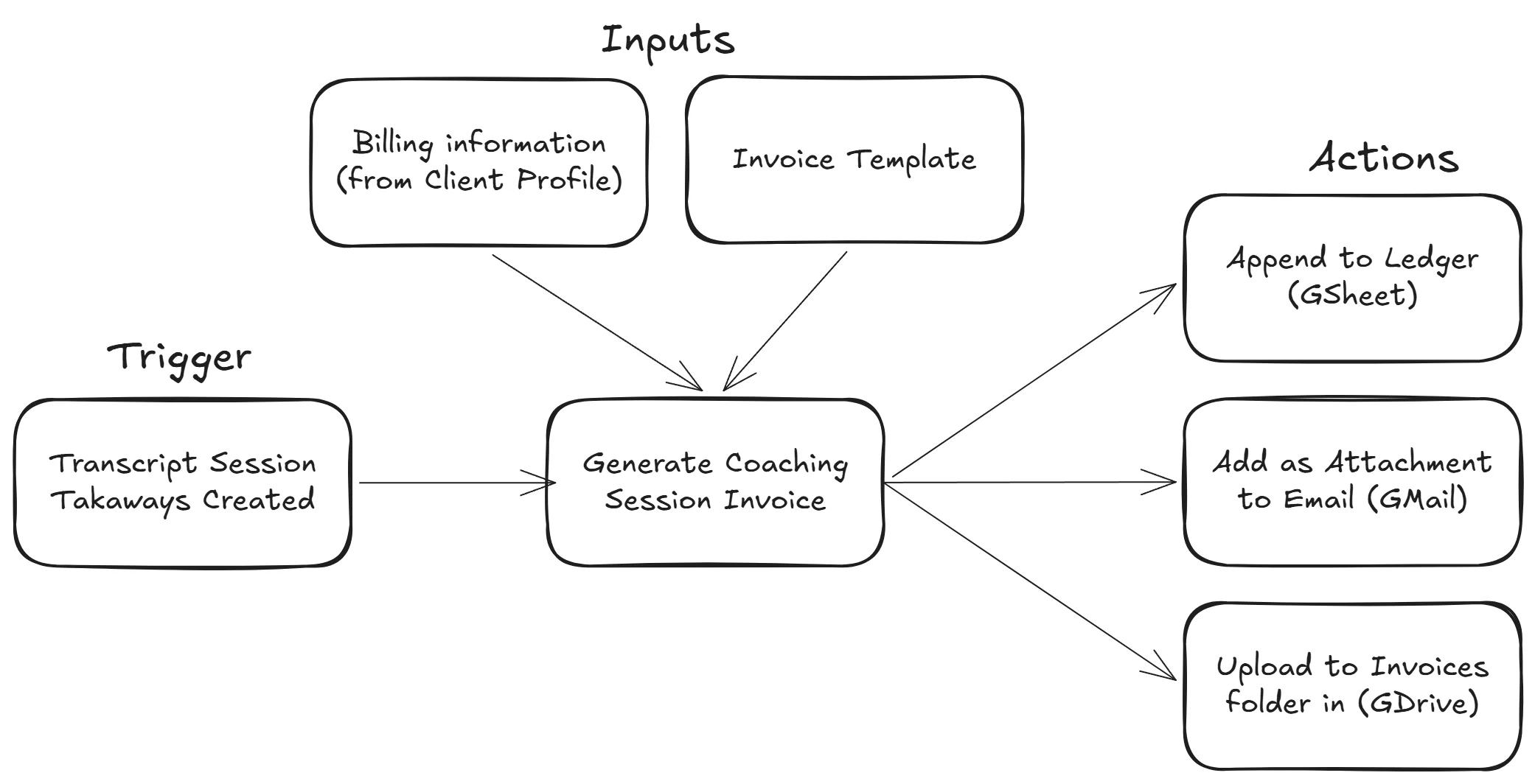
One command handles the billing cycle for each coaching session: generate invoice PDF, upload to Drive, create Gmail draft with attachment, log to ledger
CoachingWorkflow
Coaching Invoice Automation
Why It Matters to Me

Billing was four manual steps I repeated every month: fill in the invoice template, save as PDF, attach it to an email, and update the ledger. Each step was short, but required tab switching and folder navigation and was easy to lose context. Instead, the workflow does all of it, and I just review the draft and send.

My Learnings
  1. Build on top of what already works: I extended my existing coaching workflow to cover a repetitive process. Adding billing as its own layer meant each step (generate, upload, draft, log) was self-contained. If something broke, I could look at just that one piece without touching anything else
  2. Pick the right tool for the job, even if it takes two tries: I initially tried wiring this up through a MCP server directly, but ran into limits when passing large files. Switching to command-line tools was more forgiving with data size and, once set up, made the whole system more flexible and reusable
  3. Automate the mechanical parts, stay present for the human parts: The workflow deliberately stops at a draft. Billing is mechanical, but the email itself sometimes needs a personal note based on something I noticed during the session that wouldn't show up in a transcript
May 2026
Awareness Posters
May 2026
Awareness Posters
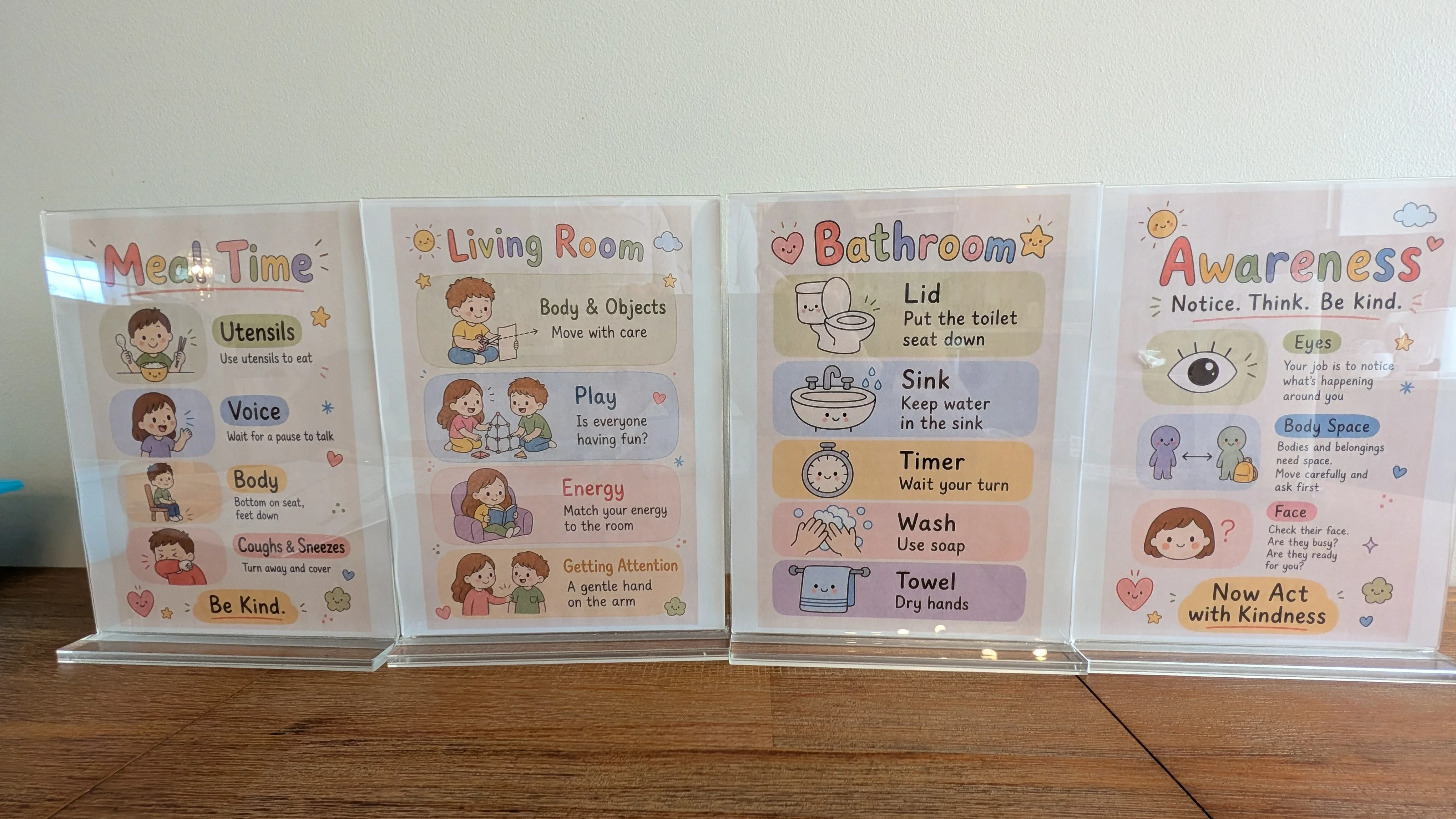
Behavioral posters for rooms of the house (living room, dining room, bathroom) each targeting behaviors that happen there
FamilyPrintable
Awareness Posters
Why It Matters to Me

Previously, we had a month where there were goals focused mostly on reducing negative behaviors, but they didn't stick well because they were too broad and abstract. These posters emerged as physical representations of the principles and positive behaviors we wanted to reinforce within the home. The home environment itself became part of the reminder system.

My Learnings
  1. Positive and concrete goals work better: Binary, trackable actions gave the kids something tangible to succeed at rather than something abstract to avoid. The more observable the behavior, the easier it was for both the child and parent to reinforce consistently.
  2. The real work was shaping the problem correctly: Working with AI, the process became: Identify the real underlying friction / Define the theme and behaviors / Shape language for a 4-6 year old / Create visuals that nudge / Choose a medium that fits the environment. The challenge was less about "making posters" and more about correctly framing the behavioral problem
  3. Scrappy iteration was part of the process: The process was exploratory and iterative rather than built from a predefined framework. I collected posters and visual systems I liked, explored divergent ideas, and discovered new constraints along the way
  4. The house became part of the system: The posters functioned as ambient scaffolding rather than lectures. The environment carried part of the repetition so the parent didn't have to constantly intervene. Rotating the posters monthly helped keep them visible and relevant without fading into the background
May 2026
Voice-to-Text Book Notes
May 2026
Voice-to-Text Book Notes
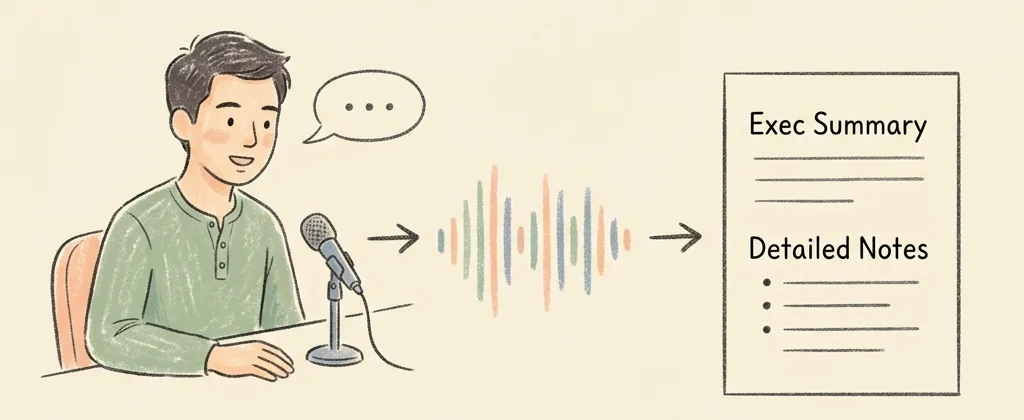
A voice-to-text workflow that captures real-time thoughts while reading and processes them into structured notes with actionable summaries.
FamilyWorkflow
Voice-to-Text Book Notes
Why It Matters to Me

I used to take book notes by manually typing them out as I read and then slowly organizing and condensing my notes later. Speaking my thoughts raw into a mic, transcribing them, and having an LLM organize the ideas and create a summary allows me to learn and distill the information more efficiently.

My Learnings
  1. Speaking thoughts raw and letting the LLM organize: Capturing thoughts and quotes as they happen and letting the LLM handle the cleaning and organizing was much more efficient than my normal process.
  2. Prioritize an actionable summary: Detailed book notes are reviewed only if something could be helpful. Placing a short, action-oriented executive summary at the top of the note ensures I can quickly retrieve the most practical takeaways before diving deeper
April 2026
Post-Coaching Workflow
April 2026
Post-Coaching Workflow
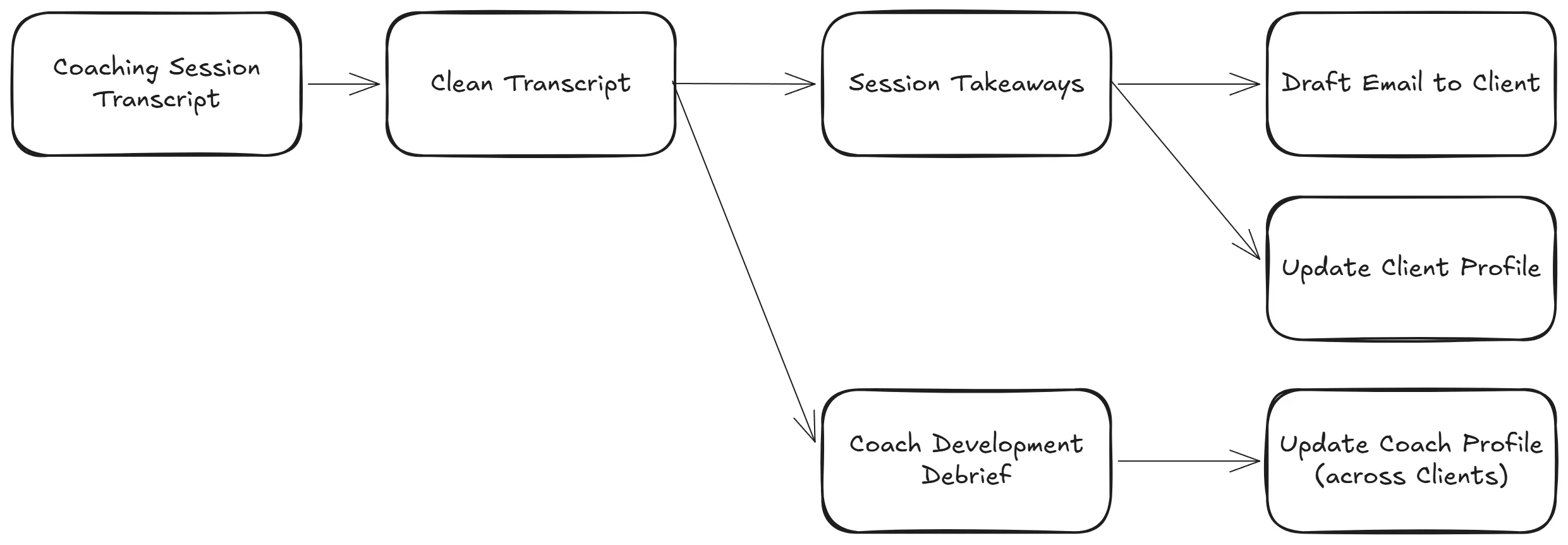
One command takes a session transcript and outputs a client summary email draft, my own session feedback, and logged commitments, all at once
CoachingWorkflow
Post-Coaching Workflow
Why It Matters to Me

After every session, I was manually distilling insights, drafting follow-ups, and reflecting on my own performance, which can take another 15-30 minutes. This workflow makes that process fast and repeatable while capturing commitments and themes across sessions. Unlike generic note tools, it's built around an ongoing coaching relationship, not just a single conversation.

My Learnings
  1. Start from proven behavior, then automate: The workflow works because it mirrors steps I had already repeated many times. Automating something unproven just creates more surface area for errors
  2. How to extend the workflow to the real world: By integrating with tools like Gmail, the system can take all the steps to complete the action. It is part of an end-to-end workflow rather than self-contained tool
  3. Context that compounds over time: Tracking commitments, themes, and open questions across sessions creates a growing layer of context. That context improves both client outcomes and my own coaching over the long term
April 2026
Video Archive Sorter
April 2026
Video Archive Sorter
A script that renames phone videos for archiving: PXL_20230127_144503372.TS.mp4 becomes 2023-01-27_Boston-MA_2m14s.mp4
FamilyTool
Why It Matters to Me

I was running into phone storage limits but didn't want to lose family videos. Filenames like PXL_20230127_144503372.TS.mp4 are useless, and I couldn't tell what was in a video without opening it. The script reads embedded metadata and renames everything into a structure I can search and sort.

My Learnings
  1. Small scripts, outsized leverage: A simple tool can eliminate hours of repetitive work and make future organization effortless
  2. Real-world files already contain useful metadata: Timestamps, geolocation, and duration are often embedded within the file. You just have to extract and standardize them
  3. Dry runs + tight scope reduce blast radius: Constrain the script to a small folder (limit what it can touch), then use a preview then confirm flow before applying changes. Together, that keeps the script safer to use
2026 Q1
March 2026
Mosaic Moments
March 2026
Mosaic Moments
A browser-based photo mosaic tool to share one composed image and zoom-out video, with nothing leaving your device.
FamilyWeb App
Mosaic Moments
Why It Matters to Me

People (especially families) have thousands of photos, but few meaningful ways to bring them together beyond albums. Mosaic Moments condenses the photos into a single, focused memory.

Personally, I also hesitate to upload photos (especially of my kids) to a company's server. This product runs in the browser, so that it is private by default and nothing leaves the device.

My Learnings
  1. AI expands what is possible, not just how fast you build: Collaborating with AI helped surface better approaches (like CIELAB vs. RGB matching) and reduced implementation friction
  2. The browser is more capable than it seems: I underestimated how far you can push the browser. Without a backend, you can still run complex image processing, perform well, and stay private
March 2026
Conversion Landing Page
March 2026
Conversion Landing Page
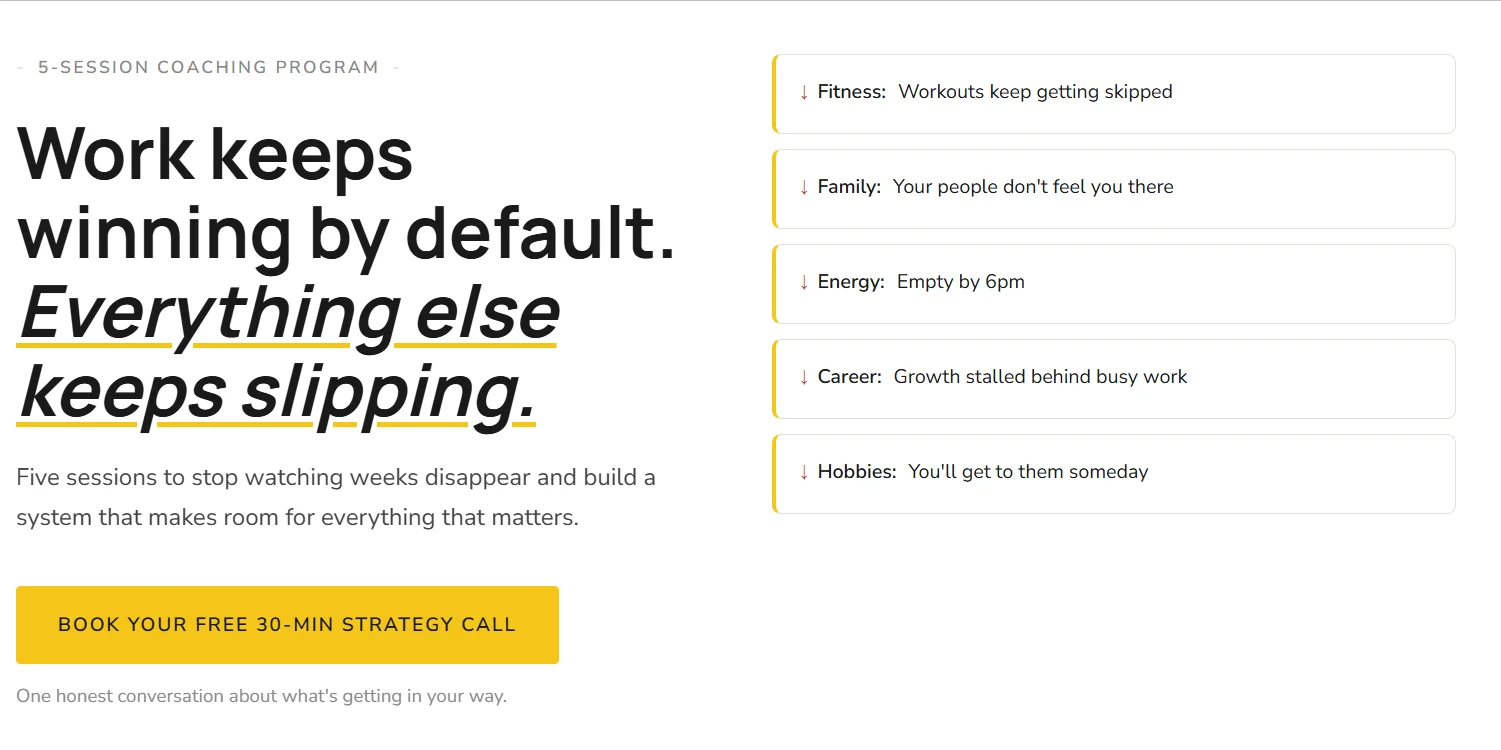
A standalone landing page for my 1:1 coaching program, built outside my managed site to own the design, tracking, and speed
CoachingWebsite
View Project
Conversion Landing Page
Why It Matters to Me

My existing website builder makes content easy to add, but design difficult to control. I was fighting the platform on things that should be simple, including responsive behavior, sticky headers, conditional display. One self-contained page gave me full flexibility: Calendly integration, ad attribution tracking, and the ability to test changes without touching anything else.

My Learnings
  1. Conversion landing pages need many small optimizations: Small improvements (image formats, fonts, load strategy) compound to meaningfully boost speed and conversions. Full control over rendering also allowed me to add responsive and conditional behavior for different screen sizes
  2. Third-party integrations come with tradeoffs: Adding tracking and conversion tools (like Calendly) require balancing performance with functionality as they can slow the page or fail silently
  3. Subdomains enable flexible hosting: Even while my main site remains on a managed platform, creating a subdomain allowed me to host these focused landing pages independently, giving speed and control over deploys, tracking, and design without affecting the main site
March 2026
Kids Habit Tracker
March 2026
Kids Habit Tracker
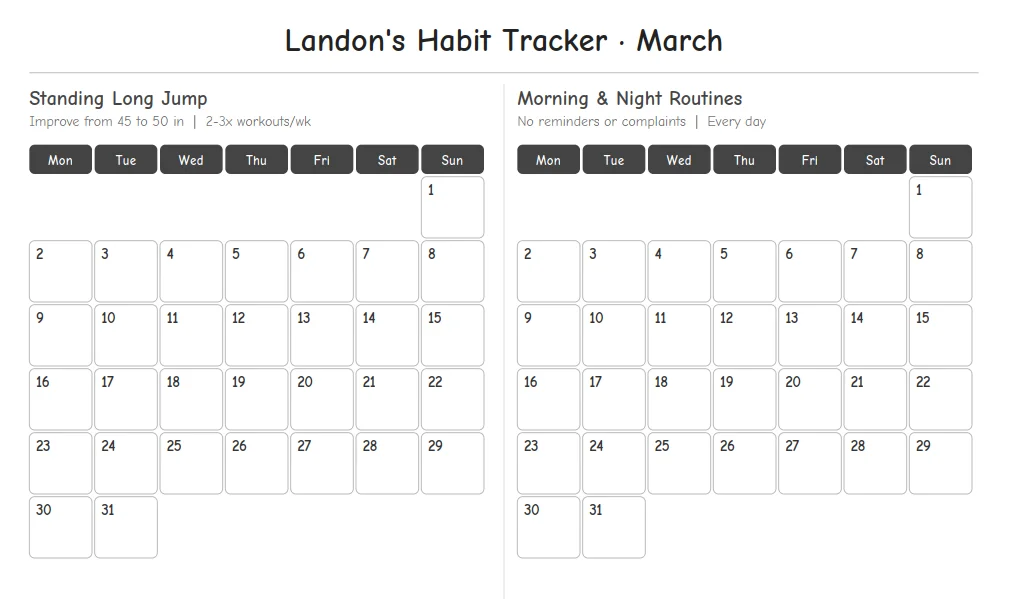
Printable habit trackers for the kids (big boxes, large fonts, made to be colored in) to stick on the fridge where they'll actually see it
FamilyPrintable
Kids Habit Tracker
Why It Matters to Me

Most habit trackers are designed for adults or to look good in a photo. Kids need something different: large enough to see from across the kitchen, satisfying to fill in, and simple enough that a six-year-old doesn't need help. I built a habit tracker for one month and one kid first and slowly extended it to multiple months, multiple kids, more goals/tracker, portrait/landscape options, and Chinese and English options.

My Learnings
  1. Iterative building drives momentum: Because I had one habit tracker that was working already, extending it was faster than designing all features at once. Each iteration has rough edges, but the use case was already there and expanding.
  2. AI unlocks more flexible tooling (with more user defined constraints): Using python + reportlab meant handling layout, spacing, and edge cases directly, which is normally tedious. With AI and with product management expertise, that overhead drops. I get the flexibility of full control without the usual frustration of building from scratch or fighting opinionated frameworks.
March 2026
Weekly Routine Chart for Kids
March 2026
Weekly Routine Chart for Kids
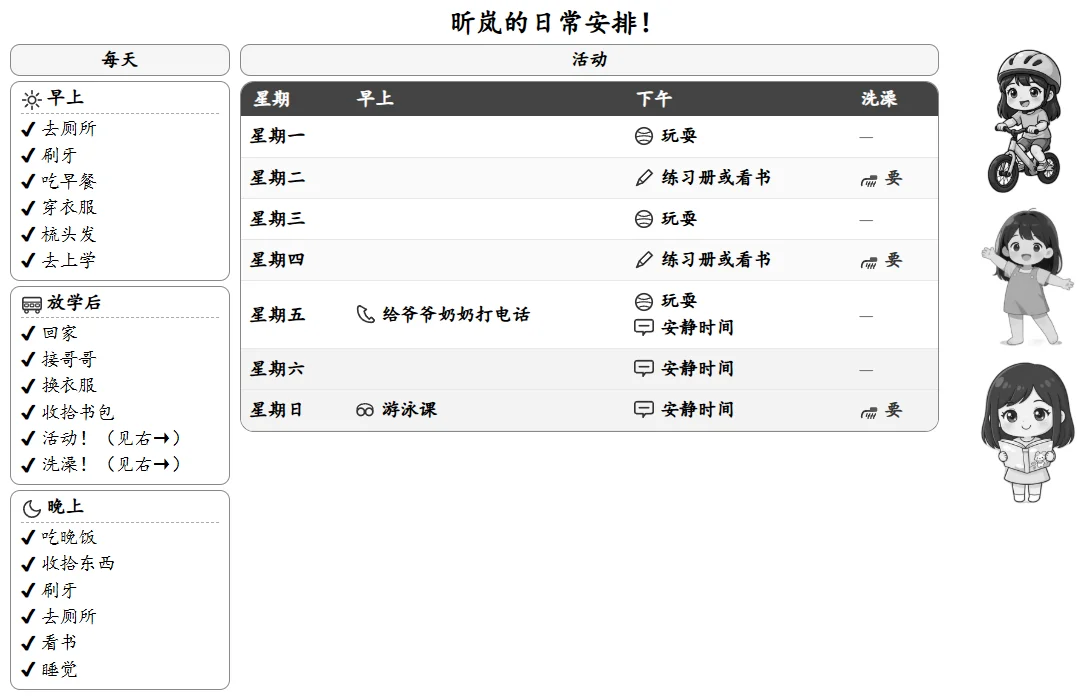
A printable, weekly chart for the daily routines and weekly activities (with options for Mandarin and English)
FamilyPrintable
Weekly Routine Chart for Kids
Why It Matters to Me

Most kid routine tools only handle daily habits. Our week has more structure, with swim lessons, regular recurring activities, and different school schedules. I wanted one page that could hold all of it and updated easily as routines change. And as an ABC, I also wanted more consistent exposure to Mandarin at home

My Learnings
  1. Imagery added complexity: Personalized photos made the chart more engaging and recognizable for my kids, but were surprisingly difficult to work with (higher AI token usage, different language to describe, harder layout reasoning). In contrast, SVG icons were much easier to describe as they are much more structured
  2. AI translations still needed human taste: One shot translation with small prompt tweaks ("native speaking", "simplified Mandarin") got 80-90% there. Manual review was still needed to make it sound fully natural
February 2026
Presence Pane
February 2026
Presence Pane
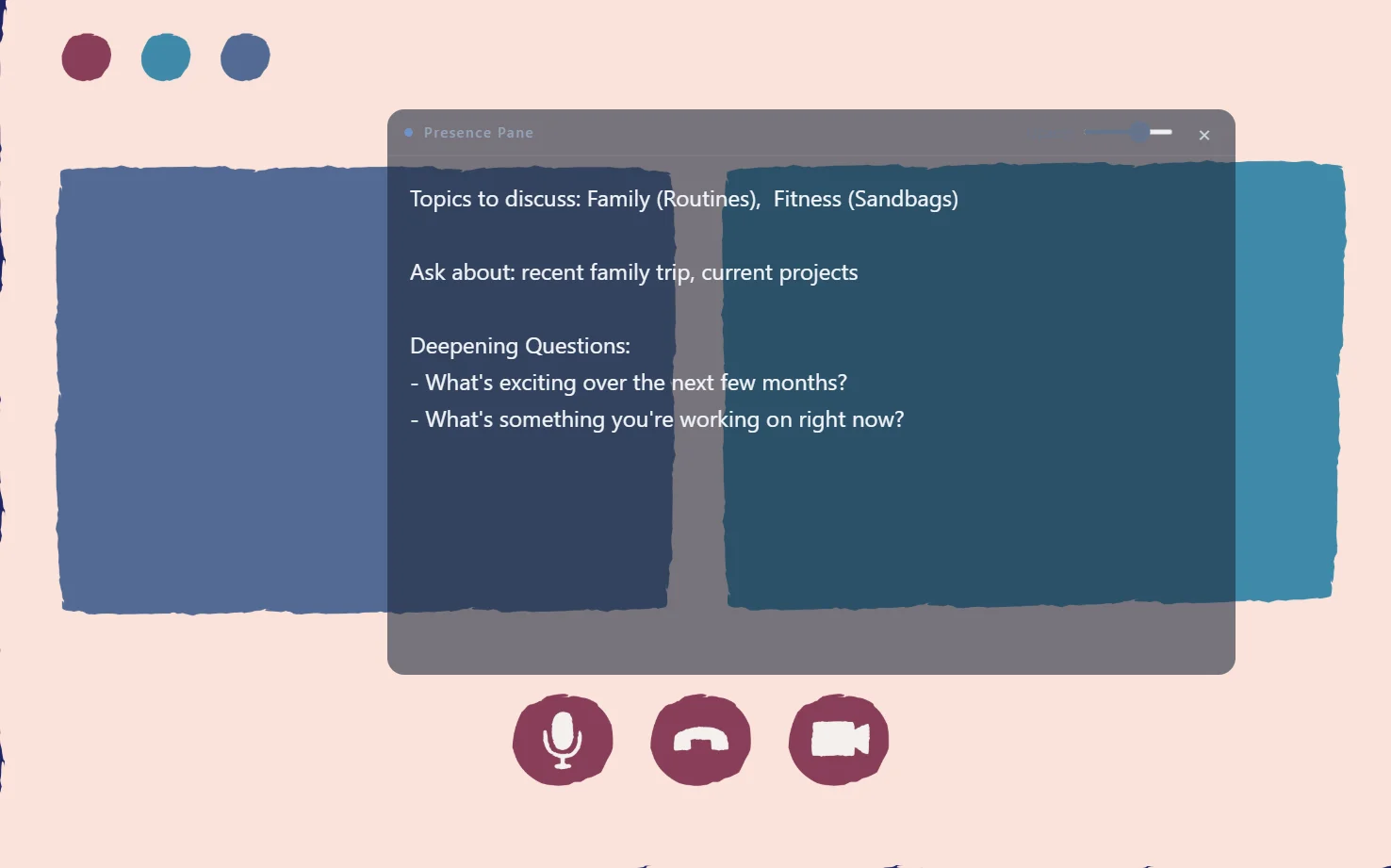
A floating notes window that sits above your video call, keeps your top thoughts visible without looking away
CoachingDesktop App
Presence Pane
Why It Matters to Me

Connecting on video has a specific problem: the moment you alt-tab or look away to take notes, the other person notices. I needed something that solved this problem (visible to me, invisible to them, non-intrusive) and nothing existing did exactly this.

My Learnings
  1. Narrow use case beats fully-featured product: I didn't need or want a full notes app. Building for the one specific moment created an app I would use over other alternatives
  2. 'Simple' user experiences are complex behind the scenes: Making simple user experiences feel lightweight and easeful required solving tricky problems around how the window behaves, how it stays out of the way, and how it responds naturally to user interaction
  3. Distribution features are another challenge: Even after the app worked, things like security warnings and packaging became blockers to sharing it more broadly. I haven't solved it, but good to be aware of the issues
February 2026
Valentine Puzzle
February 2026
Valentine Puzzle
A custom jigsaw puzzle for my wife: our photo, playable in the browser, built in a day for Valentine's Day
FamilyWeb App
View Project
Valentine Puzzle
Why It Matters to Me

My wife likes jigsaw puzzles, and I wanted to make something personal instead of ordering something generic. Lovable took my idea to launching it within a few hours.

My Learnings
  1. The opportunity for small, personal products: Building something personal for a specific person on a specific occasion is now a reasonable use of an afternoon
  2. The speed to create is faster than ever: The barrier dropped. Rather than asking 'is this worth the effort' and 'is this possible', the question now is 'is it worth my mindspace'
2024 Q2
June 2024
Personalized Books for Kids
June 2024
Personalized Books for Kids
Two personalized bilingual books for the kids with content from the kids, illustrated with AI, and printed and stapled together
FamilyPrintable
Personalized Books for Kids
Why It Matters to Me

I wanted a way for my kids to start noticing their own preferences and what they wanted early. By reflecting their own wants and likeness directly in the book, the books felt more personal and meaningful.

My Learnings
  1. Visual consistency across a full book is tough: I generated many versions of each scene to find ones that held together visually.
  2. Use AI to personalize physical content: AI can help to tailor the physical experience and increase engagement, while not detracting from presence
2023 Q3
July 2023
A Word A Day
July 2023
A Word A Day
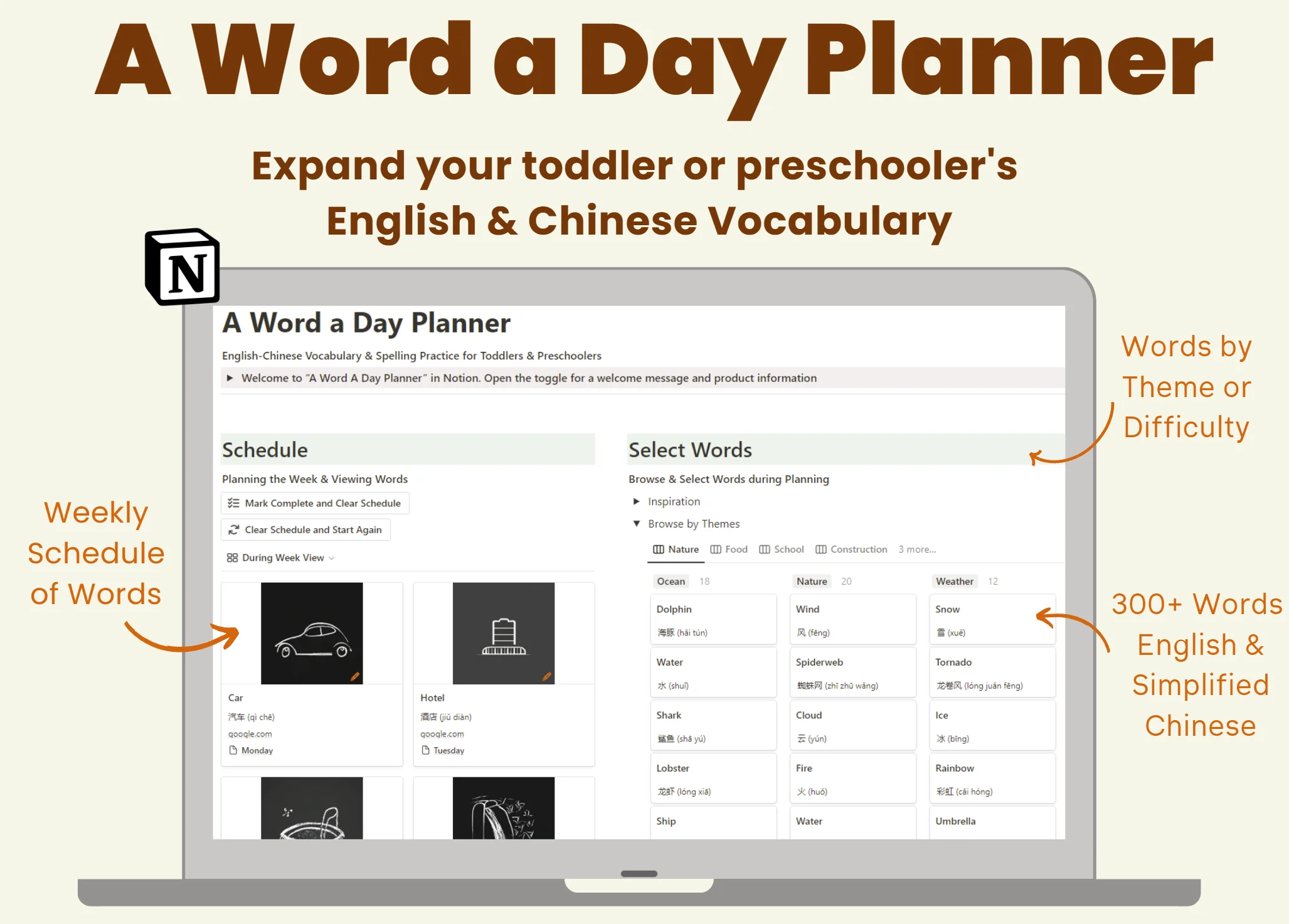
A bilingual English-Chinese tool that helps kids build vocabulary while creating simple, fun daily learning rituals for the family
FamilyWeb App
View Project
A Word A Day
Why It Matters to Me

Even on busy nights, I wanted language learning to be consistent, low-friction, and engaging. Unlike flashcards or apps, this planner integrates words, images, and scheduling so that learning can be more playful even while it is structured. In under two minutes, I could write a quick note on a lunchbox or write a word on the chalkboard

My Learnings
  1. Image creation in bulk: at the time, manually creating images one at a time was a bottleneck. Future versions need bulk generation from the start
  2. Combine Learning & Connection together: simple, low pressure routines (like word in a lunchbox or chalkboard) can be a fun way for a family to connect and learn at the same time
2023 Q2
June 2023
Child Milestone Checklist (GSheet/Notion)
June 2023
Child Milestone Checklist (GSheet/Notion)
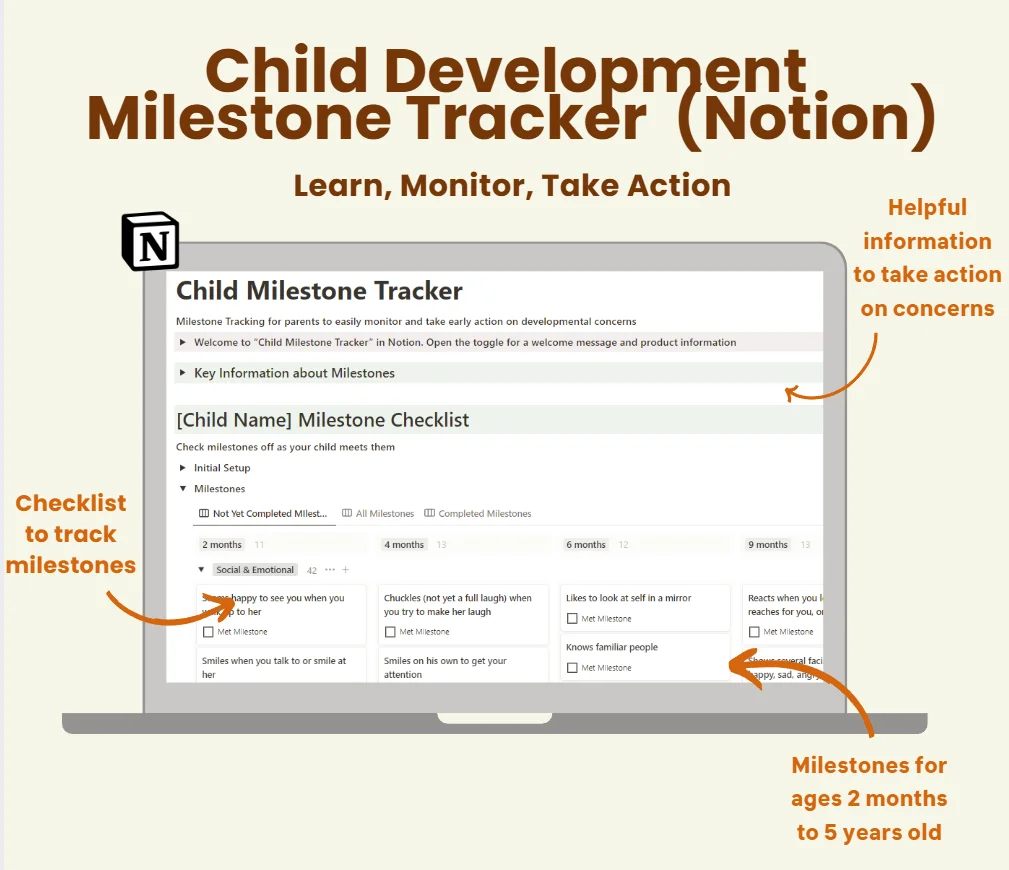
A Google Sheet and Notion template for tracking CDC developmental milestones: ages 2 months through 5 years, both kids in one view
FamilyWeb App
View Project
Child Milestone Checklist (GSheet/Notion)
Why It Matters to Me

The CDC milestones exist and are publicly available. The problem is they're spread across age-specific PDFs linking to different pages, making it difficult to track over time. I wanted to see where both kids were against the same reference in one place.

My Learnings
  1. Clarity and simplicity matters: The CDC has all the information needed. Presenting it in a straightforward, actionable way made it more digestible
  2. Packaging drives engagement: The popularity on Reddit showed that a simple, well-organized tool resonates with parents
Nothing matches that filter yet

Want to build something together?

If you're curious about how I work or have a project in mind, I'd love to hear about it

Get in touch